¶ Purpose
Learn how menus, sidebars, and page actions work so you don't get lost in the buttons. SquirrelScore is straightforward once you know where "home" is.
¶ Before You Begin
-
Be logged in
-
Ideally have at least one contest open so the sidebar shows contest links
¶ Step-by-Step Instructions
Producer sidebars also include Registration Emails, Surveys, Contest Updates, Contact Us, Vendor / Sponsor inquiries, and Contest media. Tallymasters do not manage that guest list — producers can grant Registration Emails to selected volunteers instead. Those links only show after you open the contest.
Your name in the sidebar shows your current role once a contest is selected. Email and Home Screen / browser push for a contest live on that contest’s card on My Contests. Producers also have a Notifications card on Manage. It is not a fifth phone tab.
-
After login, note the left sidebar- that's your main map.
-
Confirm your name and role near the top of the sidebar (so you know which hat you're wearing).
-
If a contest is selected, confirm the contest name shown in the sidebar.
-
Click a sidebar link for the page you need (for example Judging Sections, Contest Details, or Results).
-
Look at the top of the page for action buttons like Back, Save, Review, or Lock.
-
When you're done with a contest, return to My Contests to pick another one (or another role card on the same event).
-
Use Wiki/Support near the bottom of the sidebar when you need this documentation (it should open at or near Home).
-
Use Logout when you're finished — especially on a shared device.
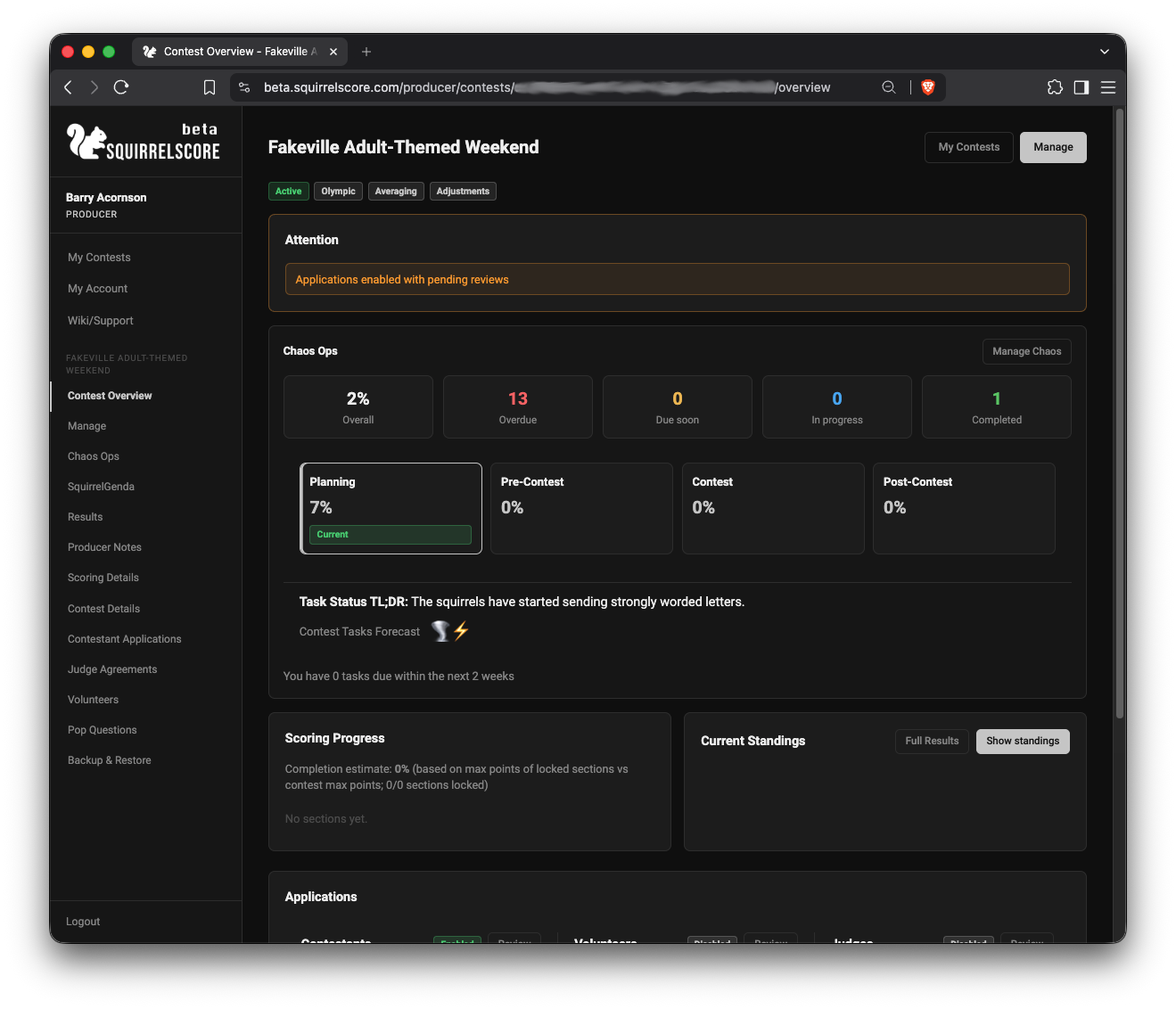
Contest Overview with Left Sidebar Menu and action buttons
¶ The left sidebar
On most pages you'll see:
-
Your name and current role
-
Section headings such as Quick Access, People, Communications, Contest Settings, and Danger (uppercase labels)
-
The current contest name in its own box (when a contest is selected)
-
Page links for that role only (Contest Overview, Manage, Results, Judging Sections, Backup & Restore, Registration Emails, Surveys, Contest Updates, Contact Us, Vendor / Sponsor inquiries, Contest media, SquirrelGenda when enabled, and so on). The current page is highlighted.
-
Email and push settings on each contest’s My Contests card — Notifications for producers (also on Manage), Push notifications for every role
-
A Help for this page link (on phones and the Home Screen app it sits under the page title; on a computer it stays at the top of the content) that opens the matching wiki article in a new tab
-
Wiki/Support near the bottom
-
Logout
Links under a contest only appear after you open that contest. If the sidebar looks sparse, you may still be on My Contests (the shared list). Opening a card also sets your role to match that card's badge.
¶ Phone and tablet shortcuts (bottom bar)
On a phone, tablet, or any view that is not a computer-sized window with a mouse, there is no top Menu button. Use the four buttons along the bottom:
-
Menu (left) opens a large, touch-friendly list of every page for your role. Headings group producer links: Quick Access, People, Communications, Contest Settings, and Danger. Other roles put contest pages under Quick Access.
-
The other three buttons jump to the pages you use most that weekend after you open a contest. Until then they stay Home, Account, and Wiki.
| Your role | Bottom buttons after Menu |
|---|---|
| Judge | Sections, SquirrelGenda, Applications |
| Tallymaster | Sections, SquirrelGenda, Results |
| Producer | Overview, SquirrelGenda, Results |
| Contestant | Contest Details, SquirrelGenda, My Results |
| Volunteer | Contest Details, SquirrelGenda, My Contests |
If SquirrelGenda is off for that contest, the second shortcut is Contest Details (producers, judges, and tallymasters), My Application (contestants), or Account (volunteers). Go Do the Things stays in the Menu list and on My Contests, not at the top of contest pages.
-
Save Scores and similar buttons stay stuck just above that bar so you can save without scrolling to the top.
-
Tap Menu again, tap the dimmed area, or press Escape to close the list.
On a computer browser (wide window and a mouse or trackpad) the usual left sidebar stays put. Same names, same pages.
¶ Search this contest
When a contest is open, a Search this contest box sits in the sidebar (and in the phone/tablet Menu list). It only looks inside this contest: people, sections, applications you are allowed to see, and SquirrelGenda titles. It does not search other contests. See Search this contest.
¶ Page headers and actions
Many pages put important actions next to the title: Back, Review, Save, Lock, download buttons, and similar. On a phone or tablet the title sits on its own row and those buttons wrap underneath so nothing slides off the right edge. Tables on those screens stack too: each row is a card with one field per line, then action buttons, with a separator between rows.
When in doubt:
-
Read the page title (are you on the page you meant?)
-
Look up and to the right for the main button (or just under the title on a phone)
-
Look left for the sidebar if you need a totally different area — or tap Menu on the bottom bar
Back usually returns to Contest Overview or the previous hub — not always the same as your browser's back button (though that often works too).
¶ Tips
-
If a link vanished, check whether you're still inside the contest — or whether the contest is inactive.
-
Keep Wiki/Support bookmarked for mid-contest "wait, how do I...?" moments.
-
Switching contests? See Selecting a contest.
¶ Common Mistakes
-
Using the browser back button several times and ending up on the wrong page. Prefer sidebar links when you're hopping between tools.
-
Assuming every role has Manage (only producers/co-producers manage contests).
-
Forgetting to open a contest first, then wondering why contest tools are missing.
¶ Frequently Asked Questions
Where did my menu go on a phone or tablet?
Use the left Menu button on the bottom bar. Open it, pick a link, then close it so you can see the page.
Why does my friend's sidebar look different?
Different role or different contest. Compare the same role on the same contest. If you have more than one role, make sure you opened the matching My Contests card.
Is there a search box for every page?
Not as a global "find anything" tool. Use the sidebar and page headings. For help articles, use this wiki's search.
What's the difference between Logout and closing the tab?
Closing the tab may leave you signed in on that browser. Use Logout on shared machines.